

Human Captioning
What is human captioning?
Human captioners are the gold standard of accessibility. They go by many names, with many acronyms around the world for professional standards:
- CART (Communication Access Realtime Translation)
- STTR (Speech To Text Reporter)
- STTI (Speech To Text Interpreter)
This isn't a gold standard as a marketing term; CART and STTRs are recognised by regulations in varying countries (ADA, Equality Act 2010, EAA) as the standard for accessibility and being compliant for reasonable adjustment requests from your audience.
Human captioning is phenomenal for high stakes events, and where accuracy is critical - whether this be keynotes, conferences or news announcements. We also see human captioners used where confidentiality is king, or in offline venues - courthouses, and business roundtables.
It is also very present in the educational and corporate sector in the day to day - if the language is particularly dense or expert specific, students and professionals will rely on human captioners as part of their journey. This aspect is often funded as part of government schemes (Access to Work, DAA).
With all this demand, it is unfortunate that it always exceeds the number of captioners available - the key is to make requests early, and prioritise captioning rather than saving it as a last addition.
Writer vs Respeaker
Most qualified professional human captioners fall into one of two groups:
Stenographers
Stenographers use a specialist keyboard, and train for approximately 2-3 years to build their speed and accuracy, allowing them to achieve a speed of up to 350 words-per-minute. Usually starting in the courthouse as a court reporter, many will then transition to provide real-time support for d/Deaf users. Some will specialise in particular fields to develop their dictionary further - pharma, for instance.
Stenographers pride themselves on their accuracy, which requires good preparation and context from organisers. They are bound by code of confidentiality as standard, and are typically registered with at least one governing body in their country of origin.
Regionally, most stenographers are found in the US, UK and Australia. In Europe, there is a velotype keyboard, but not all European language providers use it.
Considered to be the highest standard of accuracy, stenographers will be the most expensive service, and will often need to work in pairs if the content exceeds 60 minutes, or does not have adequate breaks built in.
Respeakers
Respeakers are also known as voice writers. Increasingly popular, they can achieve similar word-per-minute rates of captioning as stenographers. They use voice software to 'respeak' the content they are hearing, often in shorthand, to accurately deliver a solid caption flow for the audience.
As with stenographers, respeakers will build a dictionary for their clients to increase their accuracy in the industries they support. Respeakers will also have undertaken qualifications to serve as an STTR, and should be happy to provide these by request.
Respeaking is the most common form of human captioning in regions that did not develop a stenographic machine, or in countries where accessibility is now becoming more important - and voice writing is considered an easier tool to learn to use.
Commanding a high standard of accuracy that often matches stenographers, respeakers will still come at a higher cost depending on the language, and will need to work in pairs if content exceeds 60 minutes, or does not have adequate breaks built in.
Other types
Some providers choose to run their audio visual feed through ASR and have humans tidy the text. This is not recognised as a CART service by the relevant bodies. It can be a cost effective middle ground, but there is no regulation or recognised qualification for this action. Quality will vary immensely and is dependent on the ASR flow.
Language support
Language support depends on the availability of human captioners in the region. The client has the option to:
- Provide their own human captioners, in which case any language can be supported.
- Use Line 21's own human captioners, in which case the client can choose from the languages supported by Line 21.
| Language | Human Captioning Availability |
|---|---|
EnglishEnglish (UK)English (US) | High |
Basque | High |
Catalan | High |
Chinese (Simplified)Chinese (Traditional)Cantonese (Traditional) | High |
Danish | High |
Dutch | High |
FrenchFrench (Canadian) | High |
German | High |
Italian | High |
Japanese | High |
Korean | High |
Norwegian | High |
Polish | High |
PortuguesePortuguese (Brazil) | High |
Russian | High |
SpanishSpanish (Latin America) | High |
Swedish | High |
Thai | High |
Turkish | High |
Ukrainian | High |
Vietnamese | High |
Albanian | Limited |
Armenian | Limited |
Bashkir | Limited |
Bengali | Limited |
Cebuano | Limited |
Corsican | Limited |
Estonian | Limited |
Haitian Creole | Limited |
Hebrew | Limited |
Hindi | Limited |
Hungarian | Limited |
Icelandic | Limited |
Latvian | Limited |
Lithuanian | Limited |
Luxembourgish | Limited |
Maltese | Limited |
Romanian | Limited |
Scots Gaelic | Limited |
Serbian | Limited |
Slovak | Limited |
Slovenian | Limited |
Notes:
- Human captioners have different workflows depending on regions. A team can be anything from 1-6 captioners depending on the language.
- A baseline setup is two captioners per audio track if an event exceeds 60 minutes.
- Some languages, such as Arabic, do not have human captioners as a profession. In these cases, most subtitling work is done in post-production.
- We specialise in multilingual support and thrive in switching ‘on the fly’ languages live for our clients.
To check prices, availability, book a human captioner or for any other question, please contact us.
How captioners connect
As a human captioner, you can connect to Line 21 in one of three ways:
| Method | Type | Who is it for? |
|---|---|---|
| Writer Page | Text input | Stenographers (Stenokeys) and respeakers (Dragon Naturally Speaking with text input) |
| Speaker Page | Voice input | Respeakers that prefer to connect directly their microphone |
| Connector | Desktop application | Stenographers that use Eclipse Advantage |
Writer Page
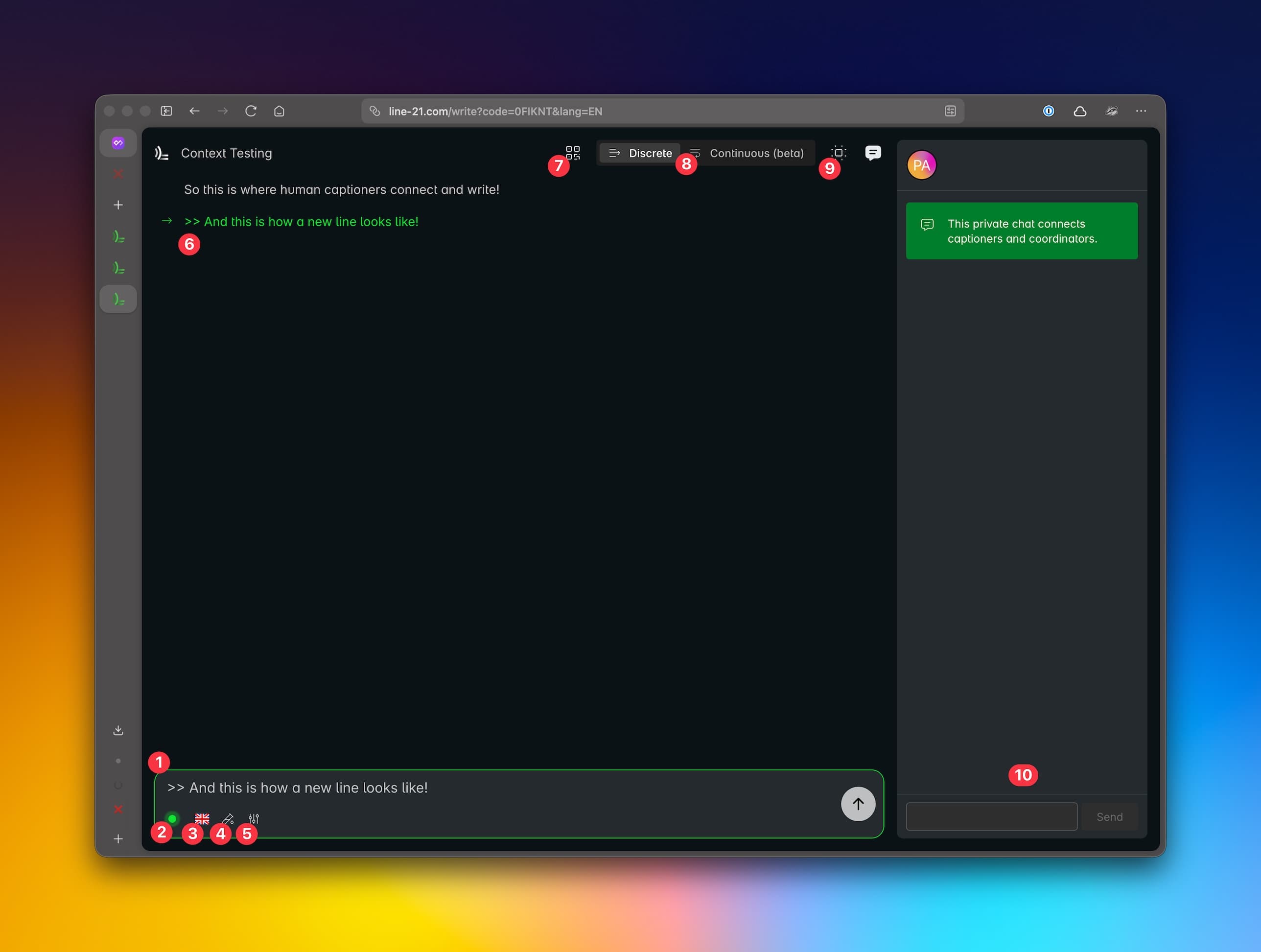
- Input box where you can direct StenoKeys to output text on mouse cursor. Use
enterkey to send a new line. Other rules for automatic line breaks can be configured in the project settings. - Connection status indicator: green when connected, red when disconnected. Shows if the connection is established, i.e. Line 21 is ready to receive text.
- Language selector: select the language of the captions. Allows for fast switching between languages.
- Simulation mode: enable/disable simulation mode. Useful for technical testing.
- Visual settings: options to highlight differences between the current revision and the original one, and to animate the differences. Useful to visualise what the AI Proofreader is doing.
- Caption monitor: shows the captions as they are being send through Line 21. If you see here a caption it means that the viewers are also seeing it.
- QR Code: share this code with the viewers to allow them to view the captions in real time. It takes them to a different page, the "Caption View Page".
- Visual modes: options to switch between different visual modes to display the caption in this page. "Discrete" shows the captions stacked up, "Continuous" shows the captions flowing in a continuous stream.
- AI Proofreader Context: shows the context of the AI Proofreader. Useful to understand what the AI Proofreader knows about the content and the event.
- Chat: this is an internal chat to communicate with the other captioners and the project support team. Useful to coordinate handovers, see notifications from the client, etc.
Speaker Page
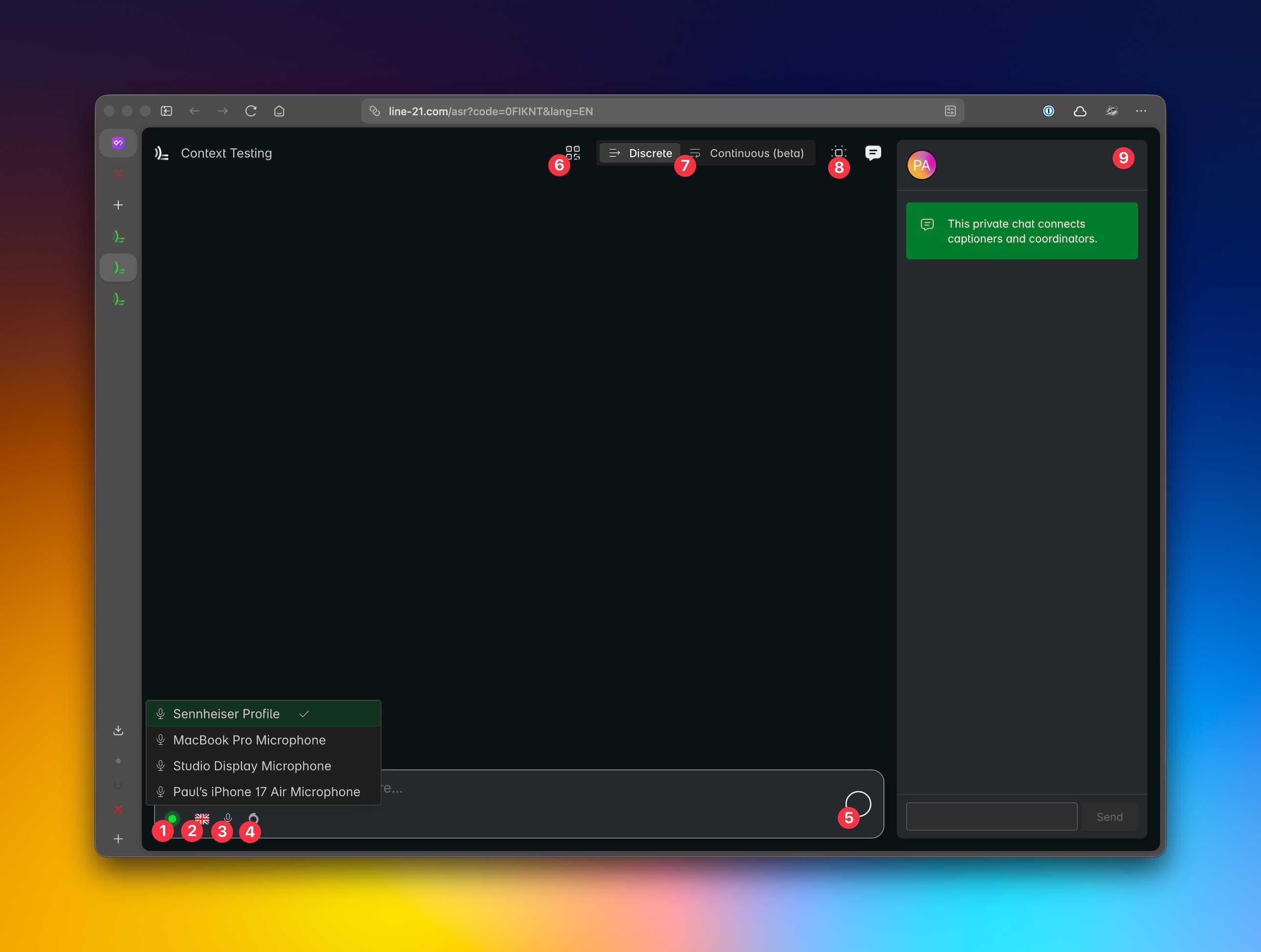
This page allows to connect directly your microphone to Line 21. It uses ASR models to transcribe your voice into text.
- Status indicator: green when connected, red when disconnected. Shows if the connection is established, i.e. Line 21 is ready to receive audio.
- Language selector: select the language of the captions. Allows for fast switching between languages.
- Simulation mode: enable/disable simulation mode. Useful for technical testing.
- ASR Models: show a list of ASR models available for the selected language. Default ASR engine is preselected. You can test which ASR models is best for your voice.
- Start / Stop voice recognition
- QR Code: share this code with the viewers to allow them to view the captions in real time. It takes them to a different page, the "Caption View Page".
- Visual modes: options to switch between different visual modes to display the caption in this page. "Discrete" shows the captions stacked up, "Continuous" shows the captions flowing in a continuous stream.
- AI Proofreader Context: shows the context of the AI Proofreader. Useful to understand what the AI Proofreader knows about the content and the event.
- Chat: this is an internal chat to communicate with the other captioners and the project support team. Useful to coordinate handovers, see notifications from the client, etc.
Notes:
- Use
Chrome/Edgeor otherChromium-based browsers for best performance. AvoidFirefoxdue to a bug in the voice input. - On first page load, make sure to allow the browser to access your microphones.
Connector
The CART Connector requires the installation of the Line 21 app. See more details on the CART connector documentation.
Human Captioning rules
To aid the human captioner, we have developed a set of rules to decide when a linebreak should be inserted automatically (thus allowing the captioner to keep writing without having to use the "enter" key). The rules are:
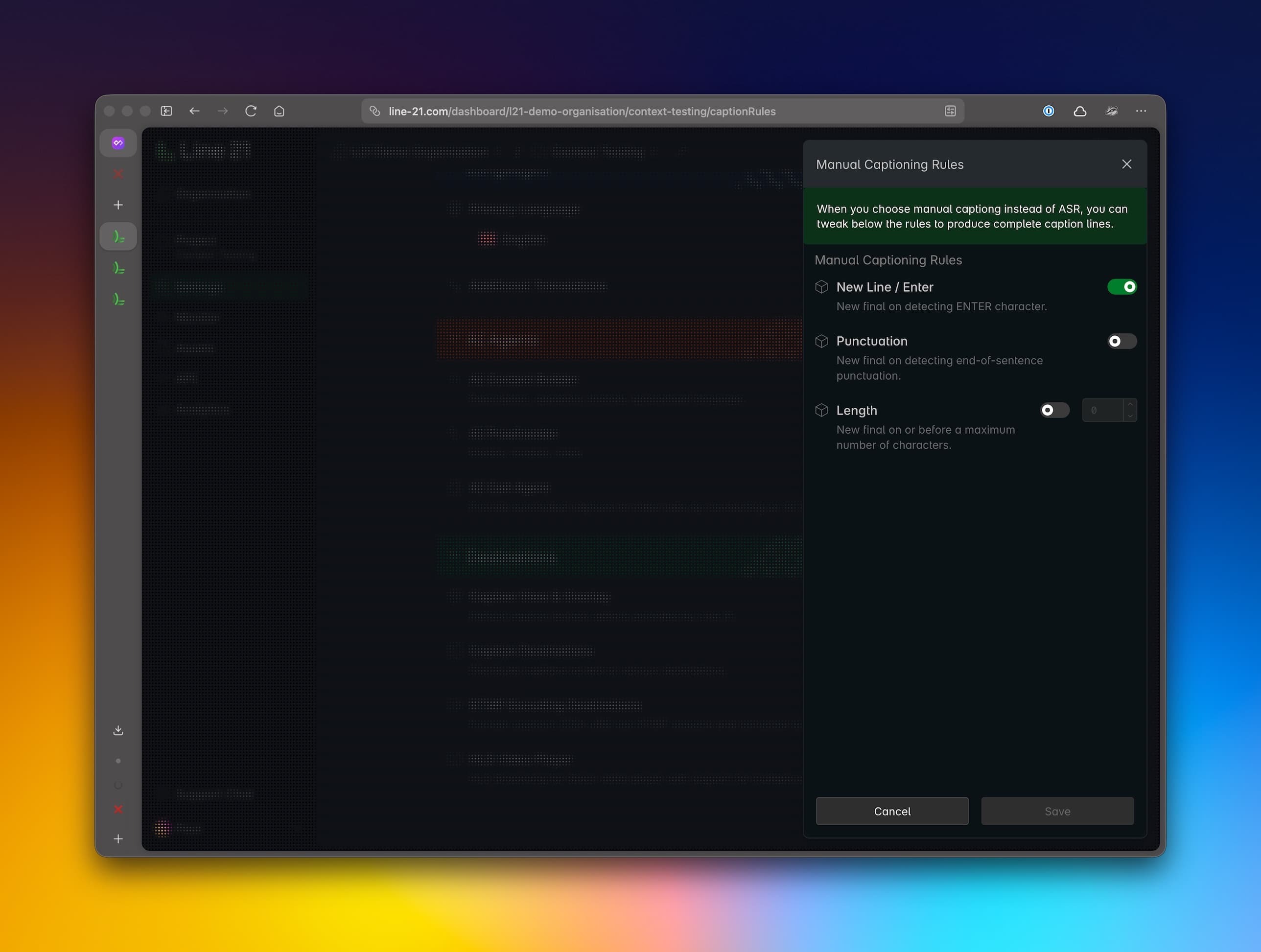
New line / Enter: new line is detected when the "enter" key is pressed.Punctuation: new line is detected when a punctuation mark is detected.Length: new line is detected when the line length exceeds a certain number of characters.
The rules are configurable in the project settings under Languages section.
Simulation mode
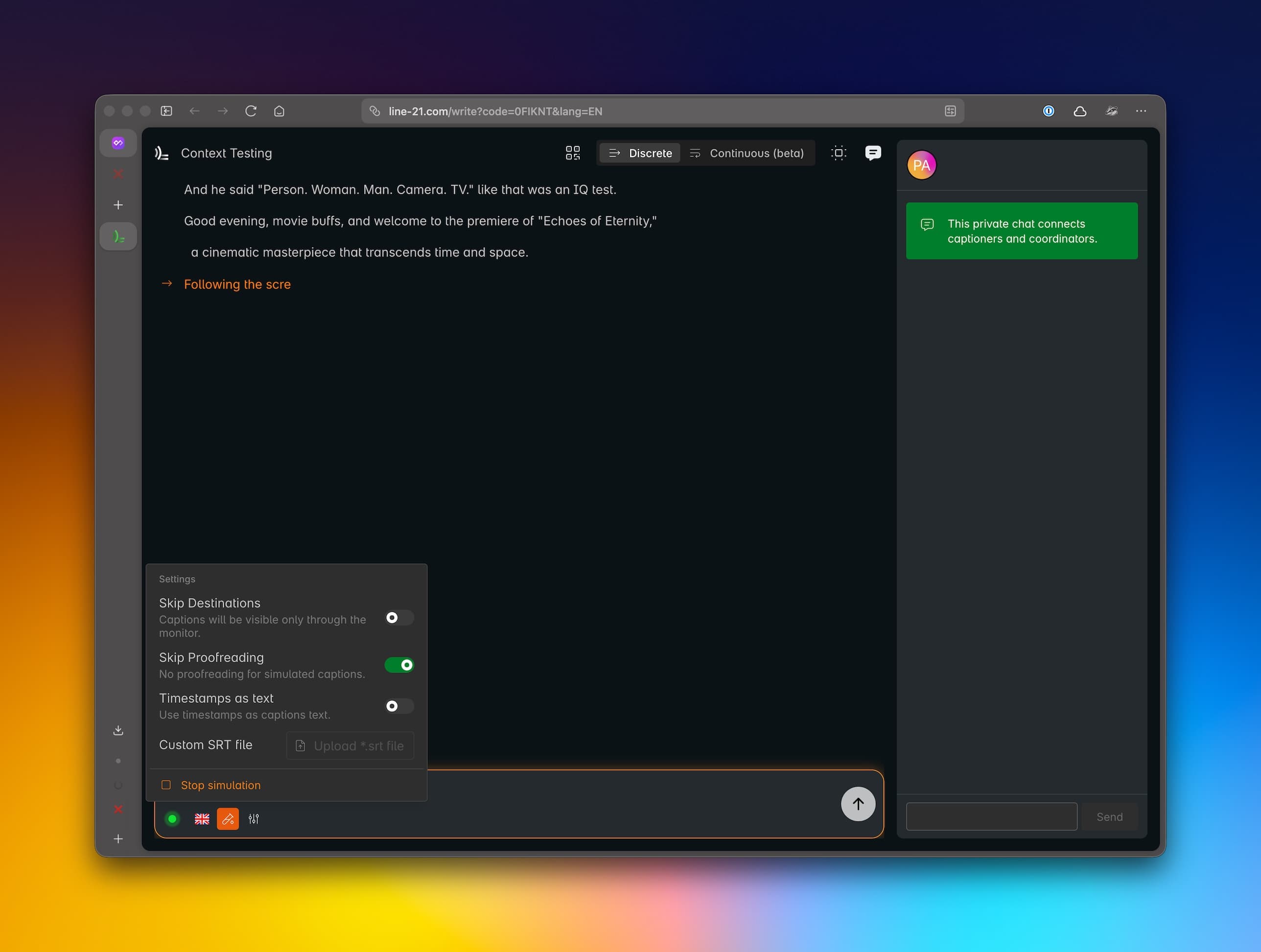
For technical testing, you can enable simulation mode. When enabled, the captions are autogenerated at a pace mimicking a human captioner. It has a number of options:
Skip Destinations: skip the external destinations (i.e. YouTube) and send the captions directly to the viewer page.Skip Proofreading: skip the AI Proofreading service and send the original captions.Timestamps as text: show timestamps as part of the caption text. Mainly for debugging purposes.Custom SRT file: instead of using the AI generated captions, you can upload a timed captions file (.srt). Useful to test in other languages than English.
Note that we use the orange color for simulated text to distinguish it from the original text.