

RTMP streaming
When to use RTMP streaming
RTMP Streaming is the most widely used protocol for live video distribution with captions. It is supported by all major social and video platforms (YouTube Live, Twitch, Facebook Live, X, etc.).
Unlike a text destination, your original video will be re-encoded to include a single subtitle track that the destination platform can extract and display as closed captions.
Line 21 provides a full cloud encoding service that handles this process for you.
Prerequisites
- Set up a RTMP or SRT ingestion feed.
- Enable an ASR engine to generate captions (optional).
608/708 cloud encoding
Sending a live video feed to a social platform is done through an older captioning protocol called CEA-608/708.
Line 21 currently supports a version of CEA-608, which comes with a few limitations:
- Only one caption track is supported (this limitation is also imposed by major platforms such as YouTube Live and Twitch)
- Encoding captions into the video introduces additional latency, making low-latency streaming incompatible
- Mainly Latin-based characters are reliably supported
Languages supported
| CEA-608/708 Encoding Availability |
|---|
Albanian |
Catalan |
Czech |
Danish |
Dutch |
EnglishEnglish (UK)English (US) |
Finnish |
FrenchFrench (Canadian) |
German |
Hungarian |
Indonesian |
Italian |
Kinyarwanda |
Norwegian |
Polish |
PortuguesePortuguese (Brazil) |
Romanian |
Sesotho |
SpanishSpanish (Latin America) |
Swedish |
Turkish |
Vietnamese |
Xhosa |
RTMP destinations
We support most RTMP-based platforms including: Facebook, YouTube, Twitter/X, Twitch, Dailymotion, Vimeo, Kaltura, Edgio, Limelight, Brightcove, IBM, Microsoft Teams, Teradek Core, Dacast, Wowza Video, Akamai and custom RTMP destinations.
Below you can find our main integrations. Contact us if you require another RTMP-based destination.
YouTube Live
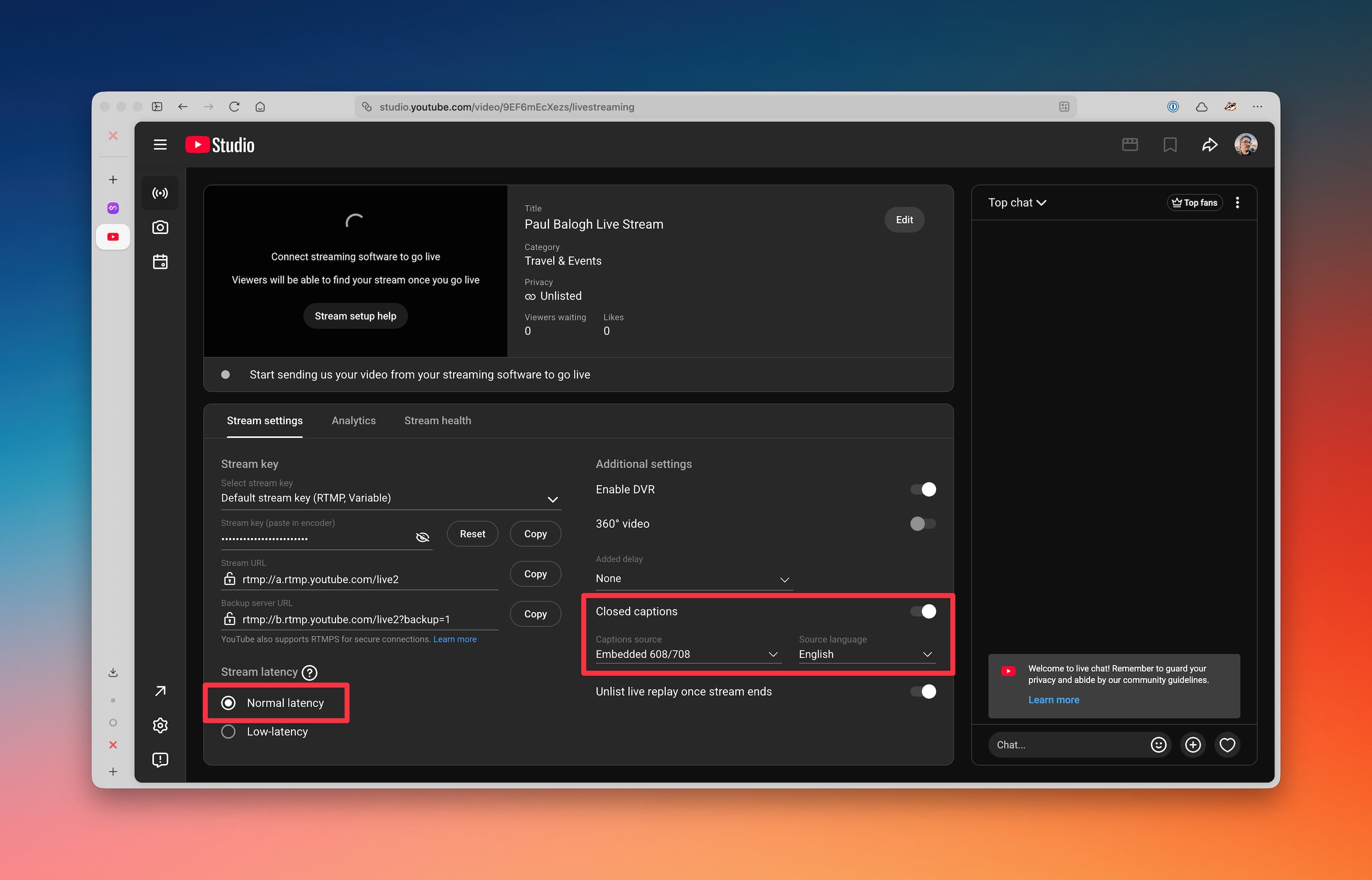
Step 1: Configure YouTube Live to accept 608/708 captions.
- Enable closed captions.
- Set Caption sources to be "Embedded CEA-608/708"
- Set Source language label.
- Ensure "Normal latency" is selected.
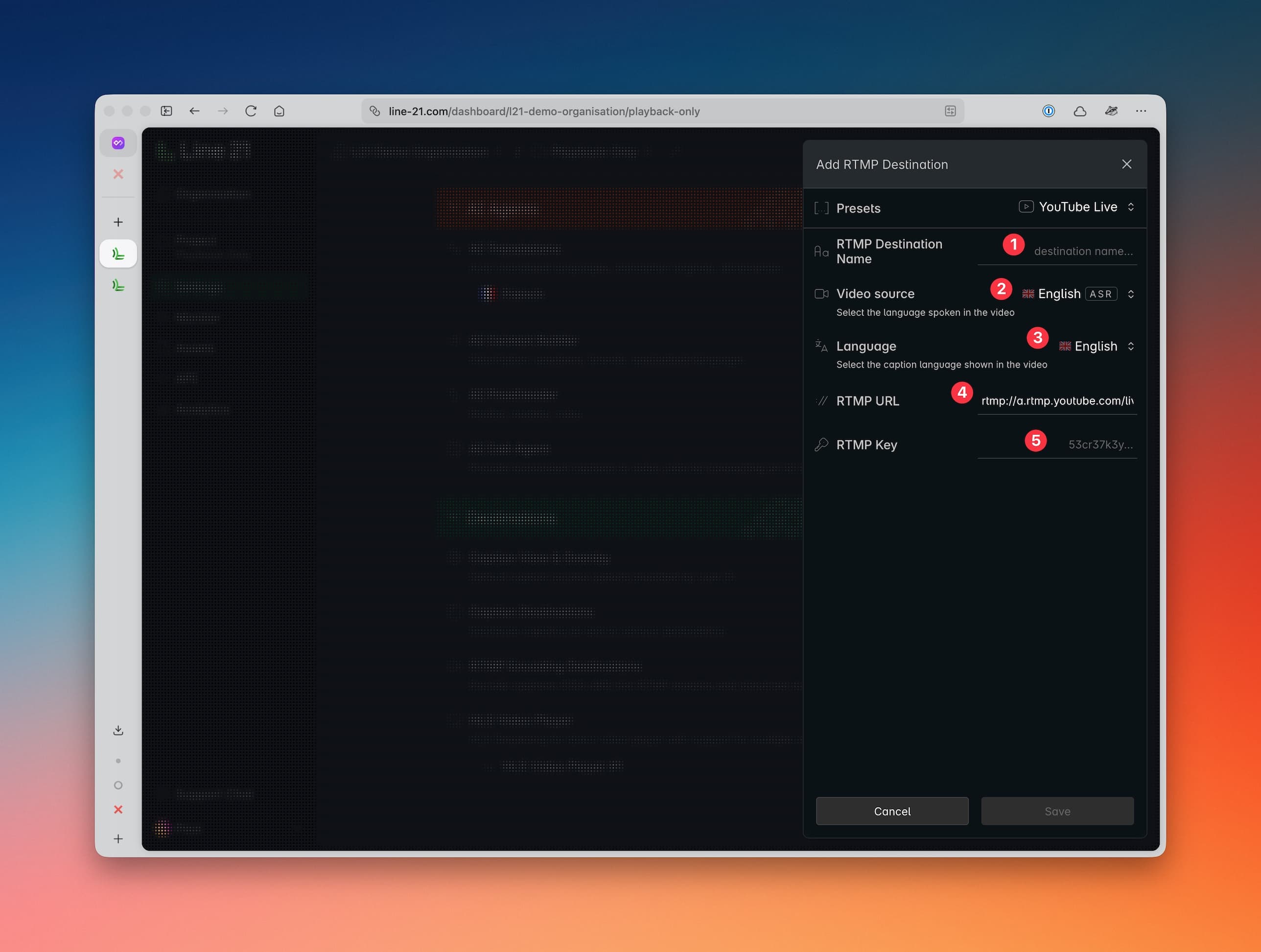
Step 2: Configure the Line 21 project to send captions to YouTube Live.
- Name the destination.
- Select a video source (from the live video feeds created before, see Prerequisites).
- Select the desired language for your captions (can be the original language or a translated language).
- RTMP Url is pre-configured.
- Add your YouTube Stream Key.
Facebook Live
Facebook Live allows you to create live video feeds for your audience.
Visit the Facebook Live documentation for prerequisites and configuration details.
Facebook Live automatically displays any caption track found in the RTMP stream, with no special setup required. Sometimes the captions are not displayed in preview, you will need to go live to see them.
Twitch Live
Twitch Live is a platform tailored specifically for live videos. Follow their instruction on how to set up live streaming.
Setting up Twitch Live in Line 21 is similar to YouTube Live.
X Live
X (formerly Twitter) allows you to stream live videos directly to the platform.
Follow their documentation to set up your first live stream.
Setting up X Live in Line 21 is similar to YouTube Live.
Vimeo Live
Vimeo Live is an alternative streaming platform similar to YouTube Live.
To configure a live stream, follow their setup guide.
Setting up Vimeo Live in Line 21 is similar to YouTube Live.
Custom RTMP endpoint
You can also use any custom RTMP server.
Whether captions are displayed depends entirely on the receiving server’s capabilities.
Setting up custom RTMP endpoint in Line 21 is similar to YouTube Live.