

Video feeds
Line 21 provides all the tools you need to ingest and output video feeds. Whether you need to extract audio from a video conference or stream your content with captions on YouTube, you're covered.
When to use video feeds
Video feeds can be used for the following purposes:
- Extract audio through ASR and create captions to deliver to your audience;
- Add captions to your live video stream and re-publish them live on your favourite social platform (YouTube, Twitch,...) through RTMP Streaming;
- Add captions to your live video stream and publish as HLS video on your website;
RTMP vs SRT
The video industry standards for real time video distribution is set on two main protocols: RTMP and SRT.
RTMP (Real-Time Messaging Protocol) is the older protocol (dating back to the Adobe Flash era) but remains the most widely supported.
All major streaming platforms, such as YouTube and Twitch, use it to receive live video streams and the same applies to many hardware encoders.
Although some variants have attempted to reduce latency, RTMP generally suffers from a delay of 2–5 seconds (and sometimes up to 15 seconds).
It only supports H.264/AAC codecs, and while it can technically include multiple caption tracks, most platforms support only one subtitle track.
SRT (Secure Reliable Transport), on the other hand, is a newer technology designed for greater reliability and lower latency.
Unlike RTMP, it's codec-agnostic. It focuses solely on transport and can carry any video or audio format.
However, SRT adoption is still limited: while infrastructure providers such as Cloudflare or Mux support it, most social platforms still only accept RTMP.
Even though SRT can technically carry multiple caption tracks, in practice many platforms ignore them, meaning support for captions can sometimes be even worse than with RTMP.
| Feature | RTMP | SRT |
|---|---|---|
| Transport Layer | TCP | UDP |
| Latency | 2–5 seconds (can be higher) | As low as 100–500 ms (tunable) |
| Reliability | Reliable via TCP, but high latency under poor networks | ARQ and FEC mechanisms for reliability with low latency |
| Security | Basic (TLS) | Built-in AES-128/256 encryption |
| Codec Support | H.264 + AAC | Any codec (container-agnostic) |
| Adoption / Ecosystem | Legacy; still used by YouTube, Facebook, etc. | Modern; adopted by Cloudflare, Mux, OBS, and others |
At Line 21, we handle the ingestion of your live stream in any format (SRT or RTMP) and take care of retransmitting it in the correct format to any destination.
You don't need to worry about destination-specific differences: just send us your stream via RTMP or SRT, depending on your setup.
Video Ingestion
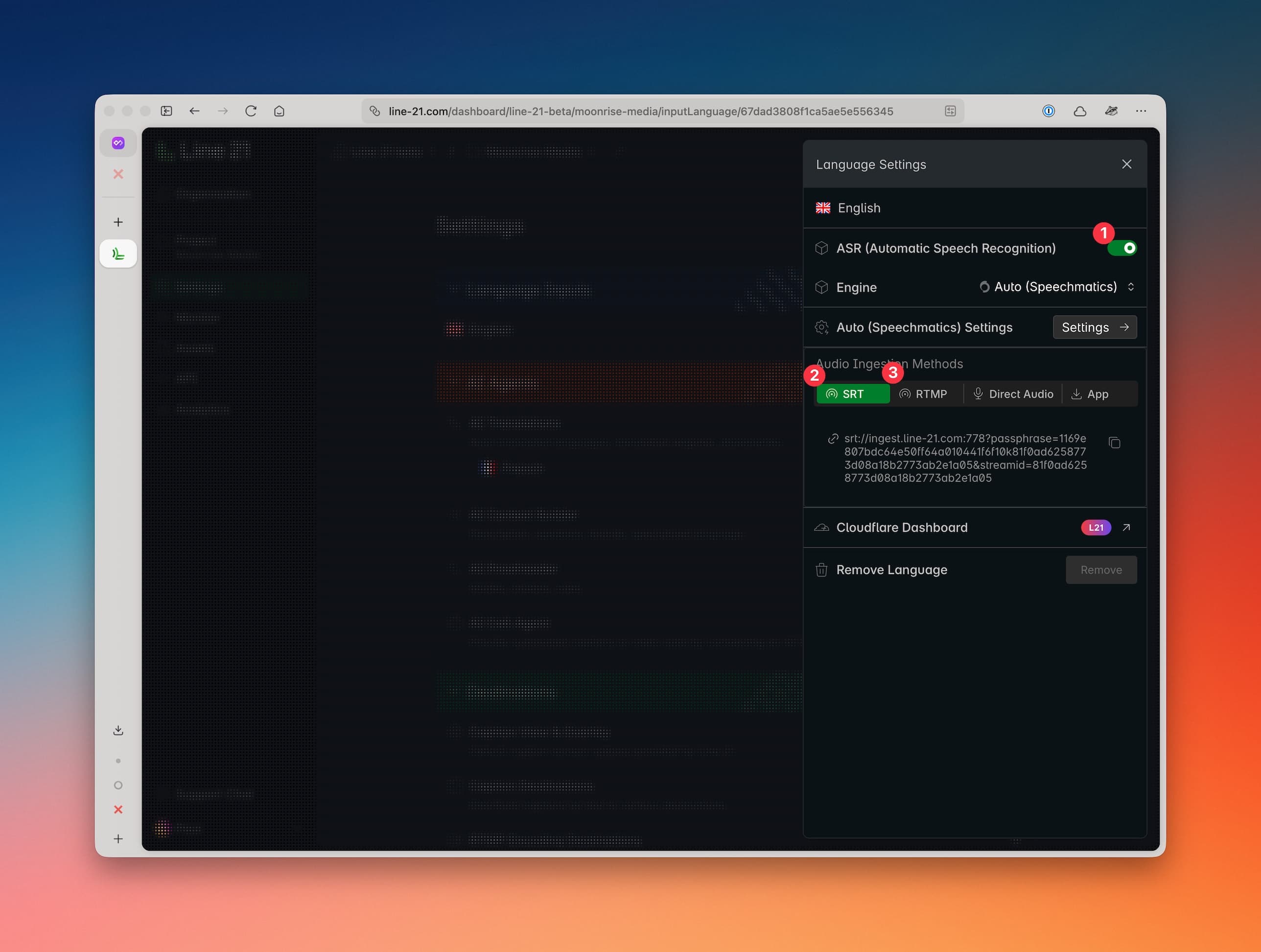
To enable video/audio ingestion, open the Language Panel, then click on the ASR 1 toggle to start processing.
It will display your SRT 2 and RTMP 3 ingestion endpoints and secret.
Recommended settings
Video size and resolution strongly depends on your final destination and we may limit some resolutions in some cases.
| Parameter | Recommended Value |
|---|---|
| Resolution | 360p to 1080p |
| Frame Rate (FPS) | 25 fps – 30 fps |
| Video Codec | H.264 (AVC) |
| Profile / Level | High @ 4.1 |
| Rate Control | CBR (Constant Bit Rate) |
| Video Bitrate | 4 – 6 Mbps (1080p) • 2 – 3 Mbps (720p) • 1 Mbps (480p) |
| Audio Codec | AAC-LC |
| Audio Bitrate | 128 – 192 kbps |
| Keyframe Interval (GOP) | 2 seconds (e.g. every 60 frames @ 30 fps) |
| Latency Mode | Low Latency (for SRT) |
| Container Format | FLV (for RTMP) / MPEG-TS (for SRT) |
- Network stability is more important than raw bandwidth. Test your upload speed.
- Avoid using Wi-Fi or mobile data for live streaming whenever possible.
NOTE: If you only need to extract captions from the audio to distribute it to your audience in a webpage, consider sending only the audio track or use direct audio ingestion.
Video Destinations
If you plan to distribute your video directly to users or through a social platform, use the following methods:
- RTMP encoding destination for social platforms such as YouTube or Facebook.
Supports only one caption track. - HLS video player for standalone playback on Line 21 or embedded on your own website.
Supports multiple caption tracks.
RTMP Destinations (CEA x08)
RTMP destinations is used when you need to add generated captions to your video and to send it to a social platform. Supported ddestinations include:
- YouTube Live
- Facebook Live
- Twitch Live
- X Live
- Vimeo Live
- Custom RTMP endpoint
Read more about RTMP Destinations.
HLS Destinations
An HLS destination creates a video playlist that your users can view through our video player.
The player can be hosted on our pages or embedded in your website.
We also provide a playlist URL that can be used with your own player of choice.
This is the best solution if you're not constrained to existing platforms and want the highest level of customization.
Unlike RTMP endpoints, HLS players support any number of caption tracks, making them ideal when you want to offer captions and translations within a single player.
Read more about HLS Destinations.
Monitoring
The monitor page will show you the status of your video streams as they pass through the Line 21 platform. You can check the bitrate, FPS, and other stream quality metrics.