

Audio feeds
When to use audio feeds
Audio feeds are important to ingest any audio source into Line 21 to let our Automatic Speech Recognition models to do their work.
Whether you're an audio/video team connecting stage audio to Line 21, or you simply want to capture your computer microphone to transcribe a conversation, you're covered.
The goal is to provide a clean audio feed where only voices are captured. In professional setups, you likely have access to dedicated microphones designed to capture only the speakers' voices. This audio is often routed into the computer through a professional audio mixer. The rule of thumb is: the cleaner the audio, the higher the accuracy. Avoid sending audience noise, ambient sounds or music together with speech whenever possible, as they will reduce ASR accuracy and overall performance.
Even if you're not using professional equipment and are relying on your computer's microphone, try to keep the feed as clean as possible by isolating your voice from external noise.
Line 21 offers multiple ways to ingest audio feeds.
ASR Page
The ASR web page is a simple web page that allows you to ingest audio from any microphone available to your browser. It is a good way to quickly test the ASR models and get a feel for how they work.
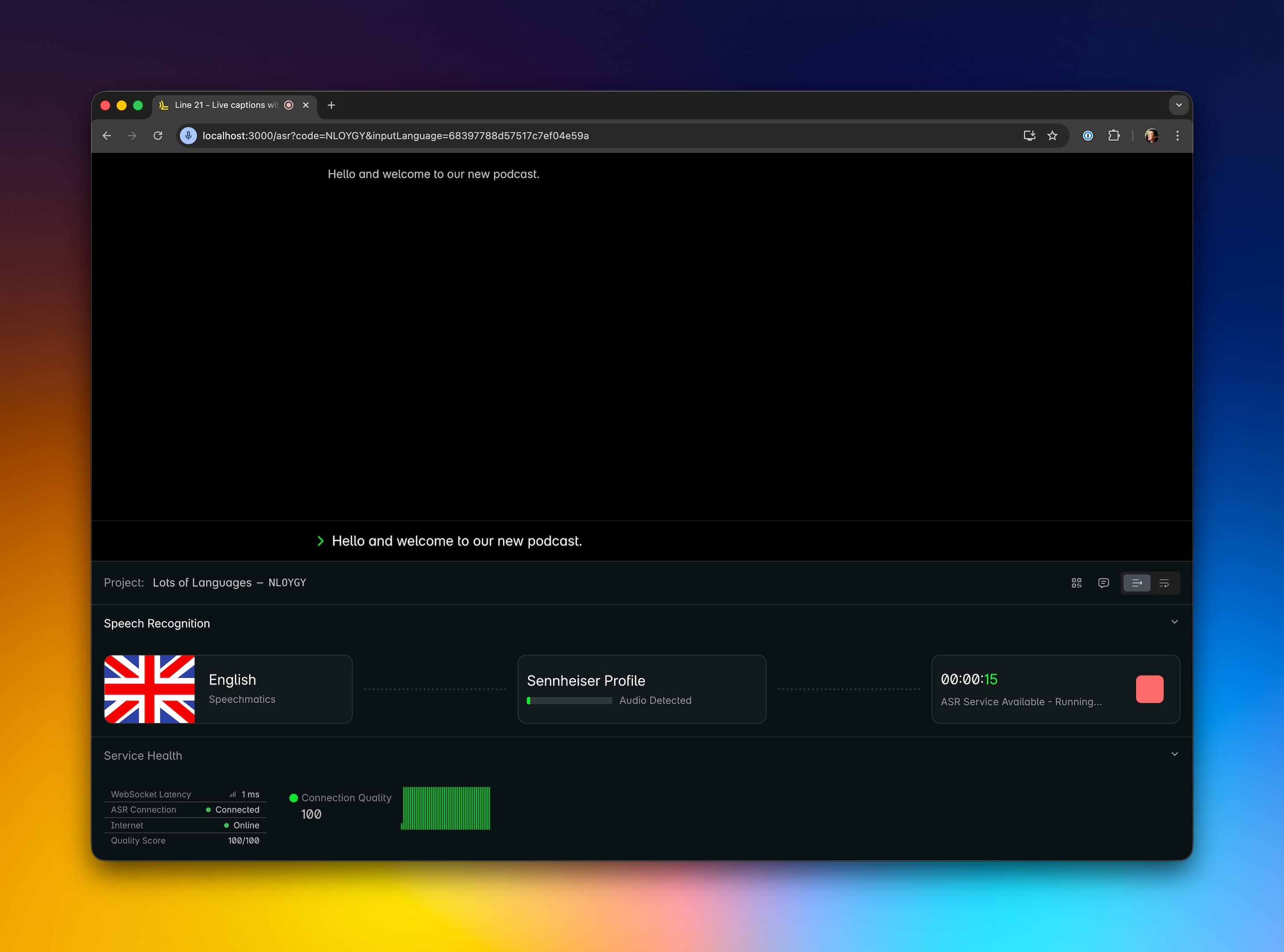
The page is structured in 2 parts:
- The top part is the monitor, it shows the audio being captured and distributed in real time.
- The bottom part is the settings and controls section.
Browser compatibility
The ASR page is compatible with Chromium-based browsers:
| Browser | Compatibility |
|---|---|
| Chrome | ✅ |
| Edge | ✅ |
| Brave | ✅ |
| Firefox | ❌ |
| Safari | ❌ |
Monitor
The monitor shows the text being transcribed in real time as well as the history of the transcribed text as your audience sees it.
Project Panel
This section helps you correctly identify the project by name and project code. As well as giving you access to 3 features:
- A QR code to quickly access the view page of the project
- A chat button to open a chat with the Line 21 team (useful to coordinate with the team, ask questions, etc.)
- A choice between "Discrete" and "Continuous" mode to display the captions in the monitor section above.
Speech Recognition Panel
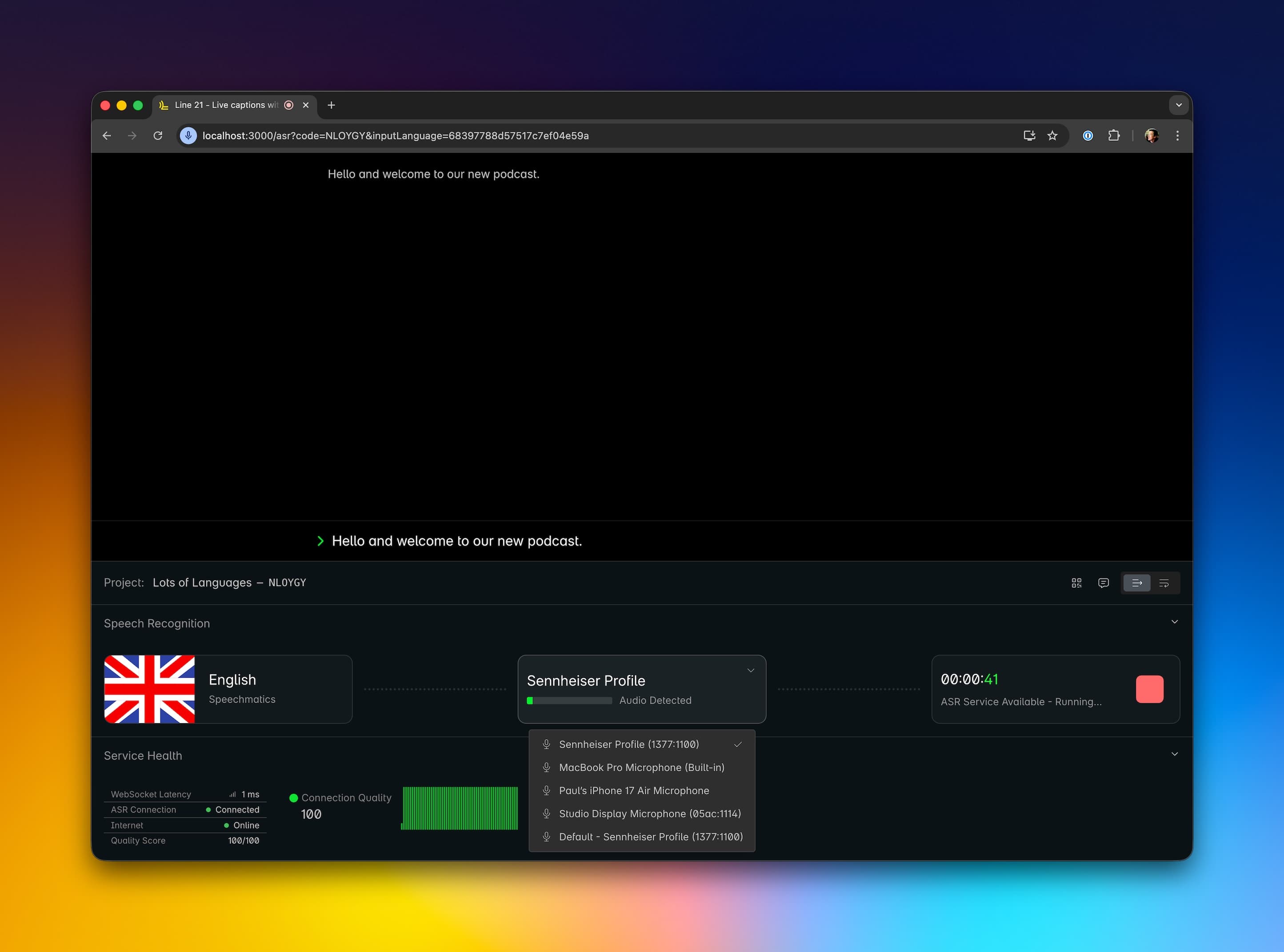
This section allows you to handle the core functionality of the ASR page.
- Language selector: select the language of the captions and the ASR model to use.
- Microphone selector: select the microphone to use for the audio capture and visualize the audio signal passing through.
- ASR connection: show the status of the ASR connection, the time elapsed since the connection was established and buttons to start and stop the ASR service.
Service Health Panel
This section shows the health of the service and the status of the ASR connection. It tracks 3 metrics and computes an overall quality score:
| Metric | Description | Possible Statuses |
|---|---|---|
| Internet Connection | Status as reported by the browser | Online / Offline |
| ASR Connection | Connection status to the ASR service | Connected / Disconnected |
| WebSocket Latency | Latency of the WebSocket connection to the ASR service | Measured in milliseconds |
You can also see a graph of the past 100 measurements of the overall quality score.
Line 21 App
The Line 21 App has a section dedicated to audio ingestion. The advantage, compared to the browser, is that you have a dedicated app and monitoring it can be easier compared to a browser tab.